How do I set up and manage a DiSC Admininistrative Dashboard?
Quick Answer:
Setting up your own Everything DiSC administrative dashboard is simple and gives you full control over ordering profiles, managing learners, generating reports, and scaling DiSC across your organization. Whether you're starting fresh with a new Admin Dashboard, upgrading your old EPIC dashboard to the Catalyst Admin platform, or adding the Catalyst Practitioner Experience for facilitation materials, each step builds on the last. In this post, you'll learn why having your own dashboard matters, what each level gives you, how to get started, and what it costs.
Why Should You Have Your Own Administrative Dashboard?
If you've been using Everything DiSC by having someone else order profiles for you, or buying them one at a time through a partner, there's a better way. Having your own administrative dashboard puts you in control of your DiSC program, and that control makes a real difference as you grow.
Here's what changes when you manage your own account:
As the keeper of the data, you have all the power. I'm high in Conscientiousness. So, you know that I love data, I lead with data, and I use it to influence people to make decisions about themselves, their teams, and their organizations. Armed with the right data, you will gain that influence with leaders and other decision makers in your organization. Listen, I've watched leaders painfully deliberate over a $50,000 software investment yet ignore the people-data that would drive the success of a multi-million dollar change initiative. You can change that when the data is in your own hands.
You own your profiles. Every profile, every learner, every group report lives in your system. You decide how to organize it, who can access it, and how it gets used. Whether you facilitate sessions yourself or bring in various outside facilitators, your profiles stay with you so you're not chasing them down the road. That's important, especially if you have multiple sites or you're building DiSC into your organization's long-term development strategy.
You can scale without friction. When a new team needs profiles, you don't have to submit a request to someone else and wait. You log in, send the questionnaires, and you're done. When your leadership team wants a free Group Map before their offsite, you generate it yourself in minutes. When a manager needs access to the management profile while they're working on performance reviews, you handle it directly. When you want to assign a quick management training module to someone who needs fast frameworks, it takes just minutes. That kind of responsiveness matters when you're juggling lots of things.
You generate reports on your own schedule. Group Culture Reports, Facilitator Reports, Comparison Reports: these are some of the most valuable tools in the Everything DiSC ecosystem. With your own dashboard, you can create them whenever you need them, for any group configuration, without waiting for a third party. (And if you have the Catalyst Practitioner Experience, Group Culture and Facilitator Reports are completely free. More on that below.)
You see the full picture. An administrative dashboard lets you organize learners by department, project team, level, location, or any grouping that makes sense for your organization. You can see who has completed their assessment, who hasn't, and which modules are activated for each learner. That visibility is essential for managing a DiSC program at scale.
(Related: Where Can I Buy Everything DiSC Profiles and Manage My Account?)
What Does Each Component in the Administrative Ecosystem Include?
The Everything DiSC Ecosystem is divided into three parts:
The Catalyst Learner Platform - For learners to get their own Profile information, compare themselves to others, build their own groups, and get personalized tips.
The Catalyst Administrator Experience - For Administrators to order, print, and manage profiles. This is a new version of the EPIC dashboard if you already have that or are familiar with it from the past.
The Catalyst Practitioner Experience - For Facilitators to get the latest and greatest facilitation materials, free Group Culture and Facilitator Reports, ongoing learning, and connections with network of assessment lovers.
Level 1: The Catalyst Learner Platform
This is the base of the ecosystem. All users (e.g., learners, admin, facilitators) learn about their styles. They can also compare themselves to others, build their own groups, get customized learning experiences, and personal tips for being more effective.
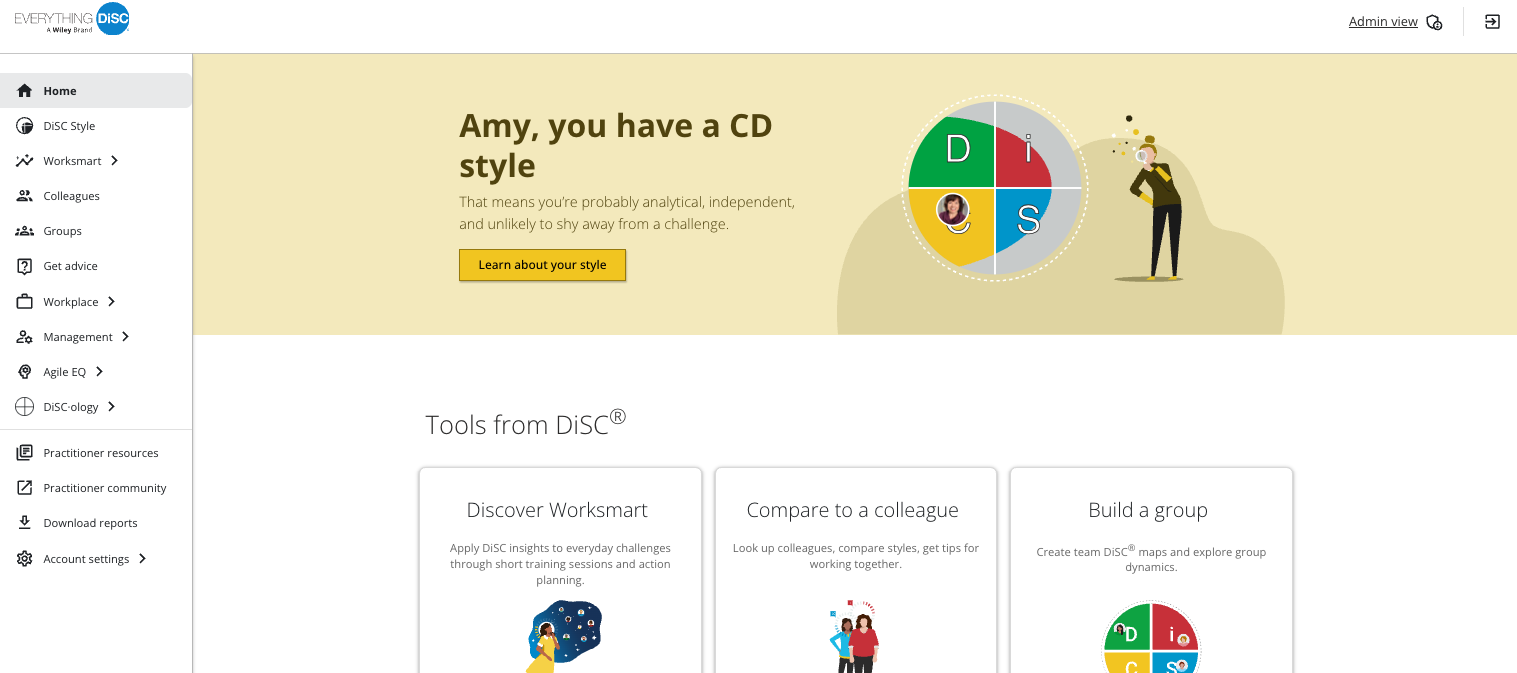
You might already have access, if you've completed an Everything DiSC on Catalyst Profile before. Try logging on here: www.catalyst.everythingdisc.com
It will look something like this:
Level 2: Your Own Catalyst Administrator Platform
This is your starting point for Administration and the system where you order, print, and manage all your Everything DiSC profiles. When you set up your account, you'll receive access to the dashboard (see the Admin View menu option at the top of the above screen shot?) and can begin purchasing profile credits and learning modules immediately.
What you can do with it:
Order profiles for any Everything DiSC on Catalyst application (Workplace, Management, Agile EQ, Worksmart). Organize learners by department, team, or any custom grouping. Print and distribute profile reports. Add modules to existing profiles so learners can expand their experience without retaking the assessment.
How much does it cost:
Vist our store for current pricing. Your dashboard is typically set up within 1 business day of purchase.
Profiles and reports are purchased as you need them using credits. A standard Everything DiSC on Catalyst Profile runs 25 credits. Volume discounts begin with as few as 250 credits. Credits never expire, so most customers buy in bulk to take advantage of better pricing.
If you already have an EPIC dashboard, you can upgrade to the Catalyst Adminstrative Experience at no additional charge. Instructions for doing so are below.
How to get started:
Schedule a call with me or purchase your dashboard online. I'll walk you through the setup process. It takes just a few minutes to get your account active and ready to go. I'll make sure you understand how to navigate the system, order your first profiles, and organize your learners.
If you already have the EPIC Admin Dashboard, you can upgrade to the Catalyst Admin platform at no additional cost. This is the newer, more streamlined interface that integrates directly with the Catalyst learning platform your learners use.
What the upgrade gives you:
A more intuitive interface for managing learners and profiles. The ability to see individual learner information directly in Catalyst, including their "What Drives You" data. The ability to compare two learners side by side from the admin view. Seamless integration between the administrative side and the learner experience, so everything lives in one connected ecosystem.
Level 3: Add the Catalyst Practitioner Experience
The Catalyst Practitioner Experience (CPE) is the facilitation layer. It gives you everything you need to lead professional, engaging DiSC sessions, plus free reports!
What the CPE includes:
Dozens of scripted workshops, customizable PowerPoint presentations, engaging videos, handouts, and learning activities for Everything DiSC Fundamentals, Workplace, Management, Agile EQ, and the Worksmart Management modules.
Access to the DiSC Foundations course and other learning programs to build or refresh your understanding of the model.
Connection to a community of practitioners for ideas and support.
Free, unlimited Group Culture and Facilitator Reports (these normally cost 25 credits each, which adds up quickly).
Access to fun freebies like virtual backgrounds, pop-culture alignment tools, deeper learner and group insights, and more.
How to enroll:
You can purchase the Catalyst Practitioner Experience here. Within one business day, you will receive an email with a serial number. Enter it into the Catalyst Practitioner Experience tab within your Catalyst learner account, and you're in.
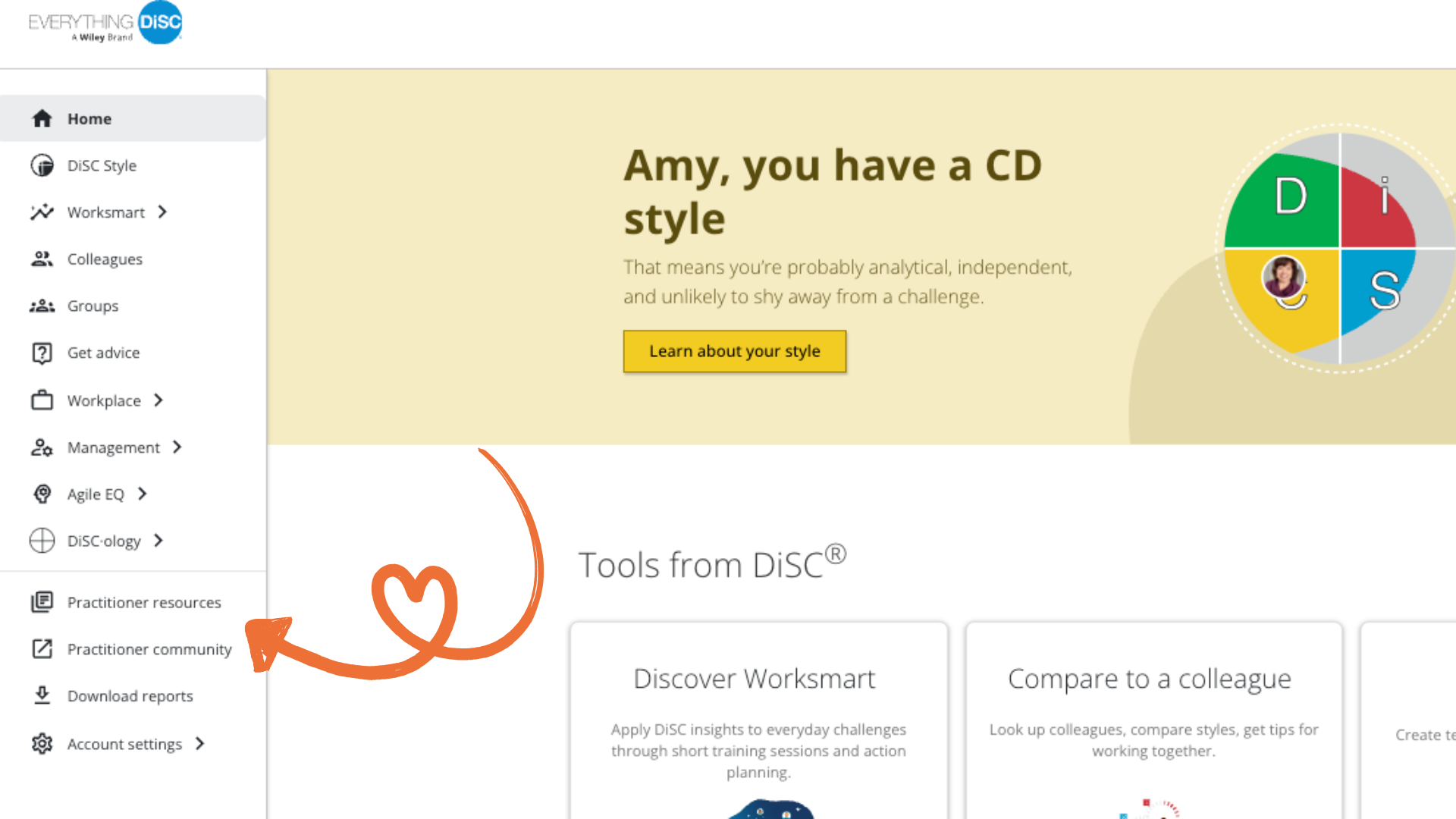
Log on to your own Catalyst learner account at www.catalyst.everythingdisc.com
Select Practitioner Resources in the left menu.
Enter your serial number when prompted to do so.
(Learn more: What is the Catalyst Practitioner Experience?)
Click here to see my brief training videos and download a Users Guide.
Q&A: Common Questions About the Administrative Dashboard
Do I need to be certified to have an administrative dashboard?
No. Certification and the administrative dashboard are completely independent. You can set up your Administrative dashboard and start ordering profiles right away without any certification. Many organizations manage their own accounts and bring in an outside facilitator for their sessions.
That said, if you want the facilitation materials and deeper learning that come with certification, the Catalyst Practitioner Experience and the full certification program both include dashboard access.
Why are the Catalyst Administrative Experience/Platform and the Catalyst Practitioner Experience/Facilitation Resources two different things?
In many cases, Admins are also Practitioners who facilitate. But, sometimes, facilitators are not given the authority to access the learners records or to add profiles. Therefore, we've had to develop two independent systems, one for admins and one for facilitators. But, if you're both, there's an easy bridge in your Catalyst learner account so you can move freely between your personal learner information, your Admin View, and your Practitioner resources.
How is the Catalyst Administrative Experience different from the old EPIC dashboard?
When you set up your administrative capabilities, you will have access to both the Catalyst Admin View and EPIC. EPIC has been our administrative platform for decades and it's still the place to do a few things you can't do on Catalyst like:
Ordering Profiles that aren't on Catalyst like Productive Conflict, Sales, Work of Leaders, and the Five Behaviors of a Cohesive Team
Delete learners from your system
Customize reports for printing, if you don't want an entire report
90% of what you can do in EPIC is available in the Catalyst Administrative Platform. Plus, Catalyst is a lot more intuitive, easier, and powerful.
What if I already have profiles in an EPIC dashboard.
That's a piece of cake.
Before you begin, gather both your EPIC User ID and Password and your Catalyst Login/Email and Password.
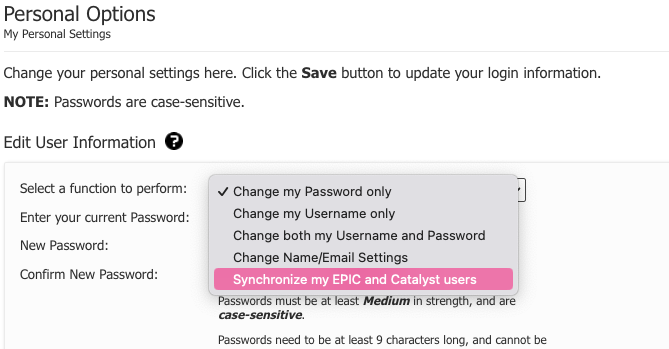
Log onto EPIC. Go to Personal Options -> My Personal Settings.
From the drop down, select: Synchronize my EPIC and Catalyst users.
Enter your CATALYST Email and Password when prompted to do so.
Log back into Catalyst. You might have to log out and back on again if your Catalyst window was already opened. You will now see Admin View at the top of your personal learner screen. Select it and you are in!
Email me at [email protected] and I can check your specific situation and walk you through the upgrade process.
Can I add modules to profiles I've already issued?
Absolutely. This is one of the most valuable features of the system. If someone completed Everything DiSC on Catalyst and you later want them to access the Management or Agile EQ modules or the Worksmart management training series, you simply add those modules to their existing profile. They don't need to retake the assessment. Their DiSC data carries over and the new module personalizes the content based on their style.
How do I organize learners if I have multiple departments or teams?
The dashboard lets you create custom groupings so you can organize learners by department, team, location, or any structure that makes sense for your organization. This makes it easy to generate group reports for specific teams and to keep track of who has completed which modules. Check out my training videos here.
Ready to Get Started?
Setting up your administrative dashboard and the Catalyst Practitioner Experience is one of the smartest investments you can make in your DiSC program. It puts you in control, saves time, and gives you the tools to scale Everything DiSC across your organization on your own terms.
If you're ready to set up your account, upgrade to the Catalyst Admin platform, or explore the Catalyst Practitioner Experience, schedule a call with me. I'll walk you through the entire process and make sure you're set up for success from day one.
🔥 Download: The Everything DiSC Facilitator's Dream Kit for ready-to-use activities, conversation guides, and reinforcement tools.


